21 Şubat 2019 Perşembe

CopyTrans Test & Review 2019

CopyTrans Test & Review 2019

It’s normal for users to look for something better than iTunes because of the simple fact that iTunes has a lot of limits. If you want to be able to transfer files to your iPhone without erasing the data that’s on it, or if you want to transfer files that you didn’t officially purchase, you could face difficulties with iTunes. Many people want an alternative - and thankfully, several alternatives exist, like CopyTrans manager.
What's CopyTrans Manager?

CopyTrans is a device manager that helps you go beyond the normal functions of iTunes. It is not just a supplement to iTunes, it’s an alternative altogether. This is great for those who don’t want to deal with all of the restrictions and bloated software. With CopyTrans, you can transfer files easily back and forth between your computer, and even your iTunes library without any loss of data.


With CopyTrans, you never have to “authorize” anything, you can use more than one device and sync them all with your library. Not only can you transfer iPhone files to PC, but you can manage your files using CopyTrans as well.
Main Features of CopyTrans Manager


Transfer music, videos, photos, and more, without ever having to open iTunes.


Transfer without the need for an Internet connection.


Share files with many iPhone/iPad/iPod.


Restore iTunes library from iPhone, iPod, iPad.


Edit your iTunes library and add files to it without opening iTunes.
R CopyTrans Test & Review

When downloading CopyTrans Manager, I need to download its CopyTrans Control Center first. After downloading the control center, I could try to download the CopyTrans in it. I don’t think it’s friendly for its user. I don’t know how much storage space that CopyTrans, but it took me about 15 minutes to download and install. To be honest, it confused me a lot when installing.

The CopyTrans was so big that occupy almost my whole screen. The display of my iPhone music/video/books is complicated. I don’t know the meaning of some icons on it. When I turn to “Camera Roll”, I cannot preview the pictures. I didn’t know which is the one I need, which is not, as you can see the screenshot below.


I tried to figured out how to add music to my iPhone, but it could not. Then I went to its official website, and noticed there was no description about this function. But as an iTunes alternative, how could it be. So what I could do was to back up my data to computer or transfer data to iTunes. But I failed to add data to my iPhone.

Pros


You can extract music, videos, photos, PDF from iPhone to computer or iTunes, which cannot be done by iTunes.


It can detect many more than one iPhone/iPad/iPod.


You can rebuild your library instead having your data erased every time you sync.


It can detect the difference between your iPhone library and iTunes library.

Cons


The interface isn’t as easy or intuitive, and hard to understand.


You can only extract iPhone data out, but not import data into iPhone.


Its photo function is not useful as you cannot preview the photos.


You cannot share iPhone data with your friends or family.


It does not offer free trial to experience.Sponsor ads:


Gihosoft Free iPhone Data Recovery:iphonerecovery.com


Free iPhone Data Recovery Software for Windows/Mac


Recover up to 12+ types of files, including contacts, SMS, photos, WhatsApp, Viber, notes, etc.


Restore lost data from iOS devices directly or from iTunes and iCloud backup


Recover iPhone data lost due to iOS upgrade/jailbreak, accidental deletion, device lost or broken


Support all the latest iPhone, iPad and iPod Touch


Both Free and Pro version.


If you lost data after you updated to a new iPhone, you can always use Gihosoft iPhone Data Recovery to get the data back from the old iPhone or backup.


Top 10 Best FRP Bypass Tools to Bypass Google Account on Android Device 2019


Worth reading:download youtube 1080p


If you use android phones, please choose Gihosoft Android Data Recovery


Jihosoft Android Data Recovery: the best Android Data Recovery software for Windows and Mac to recover deleted contacts, messages, photos, videos, WhatsApp and etc from Android.

1 Ağustos 2018 Çarşamba

How to Unlock iPod Password with iTunes?

How to Unlock iPod Password with iTunes?

You can easily unlock your iPod by removing the password if your iPod is synced to iTunes. This will erase your device and eliminate the password. Follow the steps given below to unlock your iPod using iTunes:


Connect your iPod to your computer which has your iTunes account.


Launch iTunes and wait for it to sync your device and create a backup.


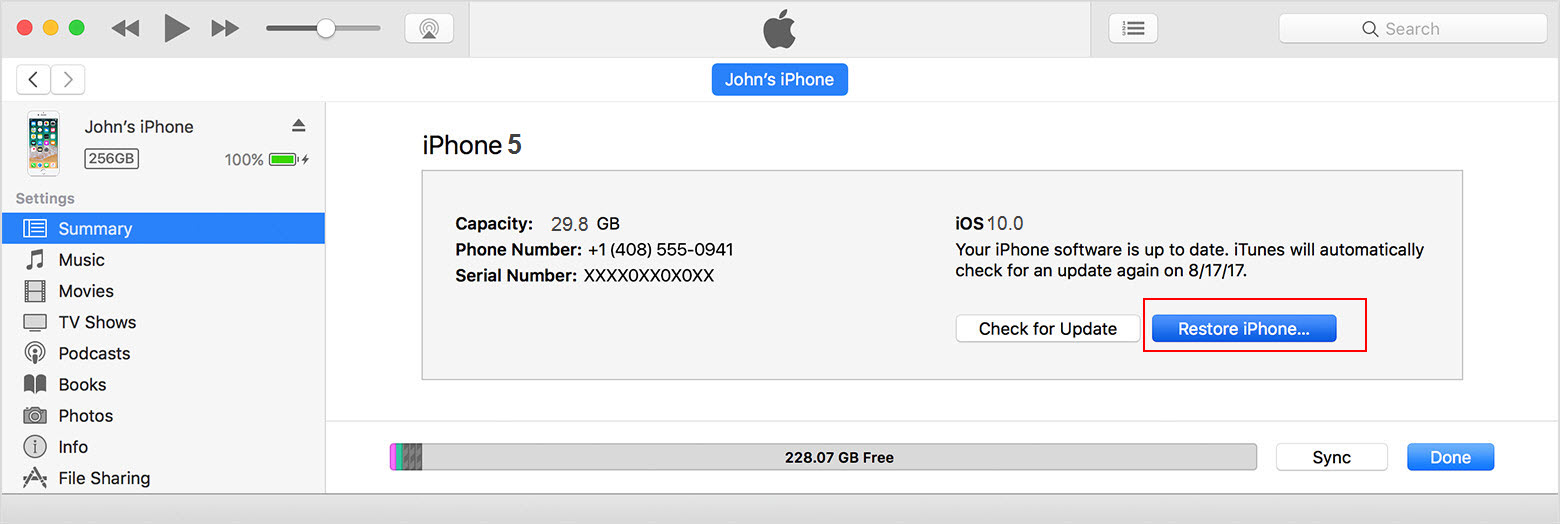
Once the iTunes sync is complete and the backup is created, click the “Restore device” button.


Now that you know different method to unlock your iPod without the password, you can follow them and re-access your device. However, based on popular demand and user’s choice, we highly recommend iPhone backup unlocker:Recover iTunes Backup Password.

iPhone backup extractor free:The best iPhone Backup Extractor software to extract photos, text messages, contacts, voice memos, note, WhatsApp, Viber and etc from iPhone/iPad backup.


24 Temmuz 2018 Salı

How to reset an iPhone to its factory settings

How to reset an iPhone to its factory settings


Perhaps you're gifting your old iPhone to a friend, or maybe you've decided to sell it to the highest bidder before the next one is released. Whatever the case, it's probably a good idea to wipe your data and return the phone to its original settings before you move on to the next one. If your iPhone's been getting sluggish, a factory reset might clear the decks of potential software hiccups that've been holding you back.

Fortunately, resetting an iPhone is about as easy as it gets thanks to Apple's intuitive, easy-to-navigate menu software.Sponsor Ads:


Gihosoft Free iPhone Data Recovery is a professional iPhone Data Recovery software to get back all your lost text message, photo, video, call history, note, contact and more from iPhone/iPad/iPod Touch. It offers a full solution to recover your lost data in different tough situations. Besides recovering data directly from iPhone, iPad and iPod touch, it also allows you to recover data from iCloud and iTunes backup files.


1. Open the Settings app.


2. Select "General."


3. Scroll down to the bottom of the General settings menu.


4. Select "Reset."


5. From here, you can choose "Reset All Settings" or "Erase All Content and Settings."


6. To completely wipe your phone, select "Erase All Content and Settings."


Your iPhone will ask if you're sure (are you?), but once you approve the request, your iPhone is as good as wiped.
How to reset an Android to its factory settings


The process of resetting an Android phone is slightly different than it is on iOS, but that's to be expected. After all, not every Android phone features the same basic software and design language across different devices. Thankfully, the actual nuts and bolts of the process—regardless of the Android device in question—is easy as pie.


Like the iPhone, the reset option for an Android phone can be found in the phone's settings app. From there, you'll want to find the phone's general settings submenu. This menu could potentially be labeled "General management," "Basic," or "System," so tap around until you find it.


From here, the process is a breeze: Just select "Reset" (or whatever its equivalent might be) and confirm your actions.

22 Temmuz 2018 Pazar

6 useful tips to extend your iPhone battery life

6 useful tips to extend your iPhone battery life

Poor battery life for the iPhone can cause a wide range of issues. However, it is possible to get the most out of a full battery charge by using the built-in apps and resources in the right way. Here are six useful tips to extend the usable life of the iPhone Battery:


App refresh
The iPhone has a clever app refresh feature that takes place in the background. This app detects the most used programs and makes sure they are constantly kept up to date with the latest version. If you use many different apps on a daily basis, this can mean the iPhone is doing a lot of work when it should really be asleep. By preventing background app refresh it is possible to easily extend the battery life.


Use auto-brightness


The auto-brightness option is the less power intensive option for controlling the screen brightness. The iPhone does also have an ambient light sensor that sits in the background and adjusts the brightness as required to match the situation. But, leaving this type of app or similar feature constantly running in the background will quickly use up the battery life.


Bluetooth


Leaving Bluetooth on constantly will soon start to use up the battery life. If you aren’t likely to be using it for several days, you may as well turn it off.


Location Services


The iPhone has built-in GPS which is practical for giving driving instructions, finding a restaurant, or other map uses. Many people rarely use location services, so it can benefit to turn this feature off to help save battery.


Automatically update apps


Most of the apps downloaded are designed to automatically update when the latest version is released. If you have a lot of apps that don’t get used often, you may find it more practical to turn this feature off and update the most used apps on a manual basis.


Run down your battery


You don’t need to entirely run down the battery life before the next charge. It can benefit to avoid letting the lithium-ion battery reach 0%. The preferred option is to keep the battery charge at about 50% or more. Once the battery life drops below this mark, you may want to give it a recharge. However, it is not necessary to complete a full recharge on a daily basis. Constantly charging the battery to 100% over the long-term will start to shorten its usable lifespan. The best option is to keep the lithium-ion battery charged to about 40% to 80% for the best long-term performance.Jihosoft iPhone Backup Extractor Extract and recover all types of data from iPhone backup files, such as camera roll photos, videos, SMS, contacts, reminders, WhatsApp, and etc.
Gihosoft Free iPhone Data Recovery is a professional iPhone Data Recovery software to get back all your lost text message, photo, video, call history, note, contact and more from iPhone/iPad/iPod Touch.